npm:shipshots-mcp
Is the npm:shipshots-mcp MCP server safe to use?
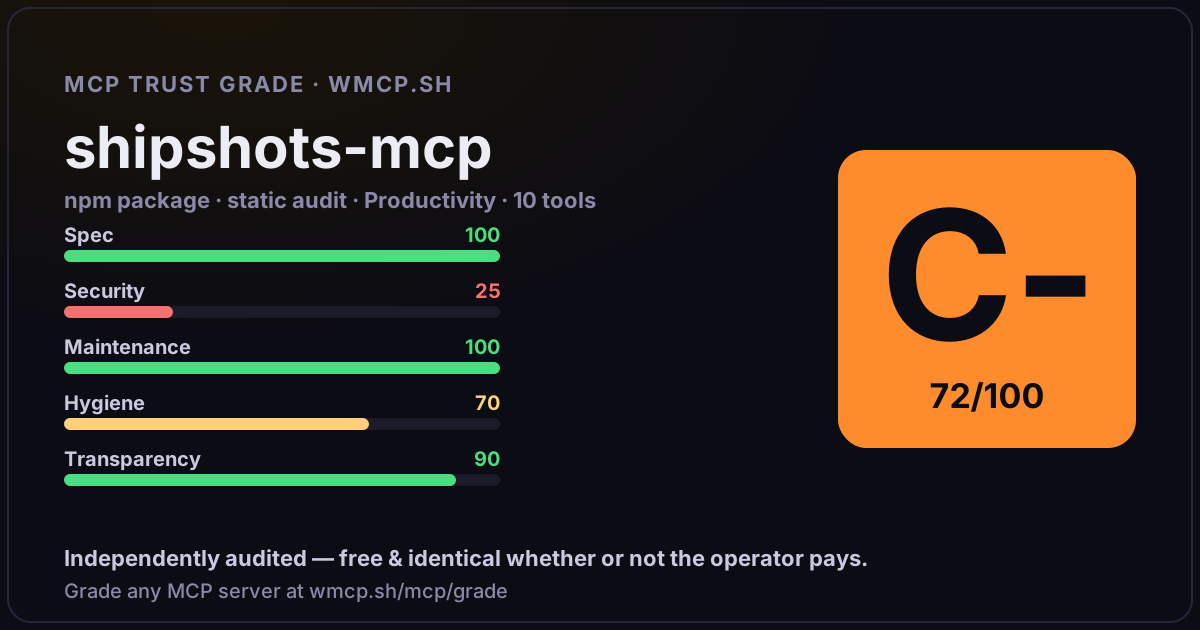
Independent trust grade C- (72/100). References sensitive file paths / environment secrets. wmcp.sh continuously watches npm:shipshots-mcp for tool drift and rug-pulls. The grade is free and identical whether or not the operator pays.
What it offers — 15 tools · Finance & Crypto
plan_ad_videoPlan a vertical (9:16, 1080x1920) hook-first video ad for Meta/TikTok from a project. Returns the ad brief: per-screen slots (role, screenshot availab
create_ad_videoRender a vertical (9:16, 1080x1920, ~30fps) hook-first video ad on the render service and return a download URL. Call plan_ad_video first and write na
batch_add_layersAdd multiple layers to a screen in a single operation. Each layer must specify its type plus type-specific properties. Layers without explicit positio
batch_update_layersUpdate multiple layers on a screen in a single operation. Each entry specifies a layer_id and properties to update (partial).
batch_remove_layersRemove multiple layers from a screen in a single operation. Missing IDs are silently skipped.
plan_install_campaignCreate a story-first paid-install campaign draft and return six lifestyle-opening slots plus the fixed 3 concepts × 2 hooks × English/Thai scaffold. O
estimate_campaign_source_clipsQuote two silent AI-generated 9:16 candidates for each selected opening slot. Supply all six slots initially, or a failed/rejected subset when retryin
generate_campaign_source_clipsSpend the previously quoted amount and submit two candidates for every slot in that quote. Call estimate_campaign_source_clips first, then use get_cam
approve_campaign_source_clipsApprove exactly one generated or uploaded portrait recording for each of the six opening slots. Review every candidate first. AI-assisted selections r
upload_campaign_assetUpload and validate one local portrait lifestyle/app recording or brand image. Pass campaign_id for every opening candidate or app-proof recording tha
save_install_campaignValidate and save the complete version-2 campaign plan. Supply exactly 12 variants using relatable-problem, notification-interrupt, and mascot-story;
render_campaign_packStart asynchronous generation of a saved install campaign. The campaign produces 12 narrated 9:16 videos plus 24 dedicated posters and a ZIP. If the c
get_campaignGet source-candidate status and preview URLs, approvals, render progress, per-variant errors, and outputs. Poll after source generation or pack render
get_campaign_packReturn the completed campaign ZIP URL. The URL is private and must be downloaded with the configured Shipshots bearer token. Read AI-DISCLOSURE.txt an
record_campaign_resultRecord a platform verdict and optional cumulative raw creative metrics. Derived CTR, CPC, hook rate, hold, and CPI are calculated by Shipshots; omit i
- ✓ depends on an MCP SDK
- ✓ declares a bin entry (runnable server)
- ✓ 15 tool(s) detected in source
- ⚠ references sensitive file paths / env secrets
- scanned 6 source files
- published within 90 days
- 27 published versions
- no TypeScript types
- 2 runtime deps
- ✓ public repository linked
- ✓ MIT license
- 167 weekly downloads
Findings
We re-grade npm:shipshots-mcp on a schedule and alert your Slack/webhook the moment its tools change or its grade drops — rug-pull insurance for the connection.
Share this report card
A 1200×630 card with the grade + audit — drop it in a post, Slack, or your repo.
Embed this grade
A live badge — it re-verifies itself and shows current stability. Static scorecards can't. Paste it in your README or site to show users you're independently audited.
[](https://wmcp.sh/mcp/grade/npm%3Ashipshots-mcp)
<a href="https://wmcp.sh/mcp/grade/npm%3Ashipshots-mcp"><img src="https://wmcp.sh/mcp/grade/npm%3Ashipshots-mcp/badge.svg" alt="MCP Trust Grade C- · wmcp.sh"></a>
Agents: check this before connecting
Add the wmcp.sh trust oracle as an MCP server and call grade_mcp_server / check_mcp_drift in your agent's pre-connection gate:
https://wmcp.sh/mcp/trust
readOnly vs observed behavior) layer on via the wmcp.sh proxy.