npm:inventpay-mcp
Is the npm:inventpay-mcp MCP server safe to use?
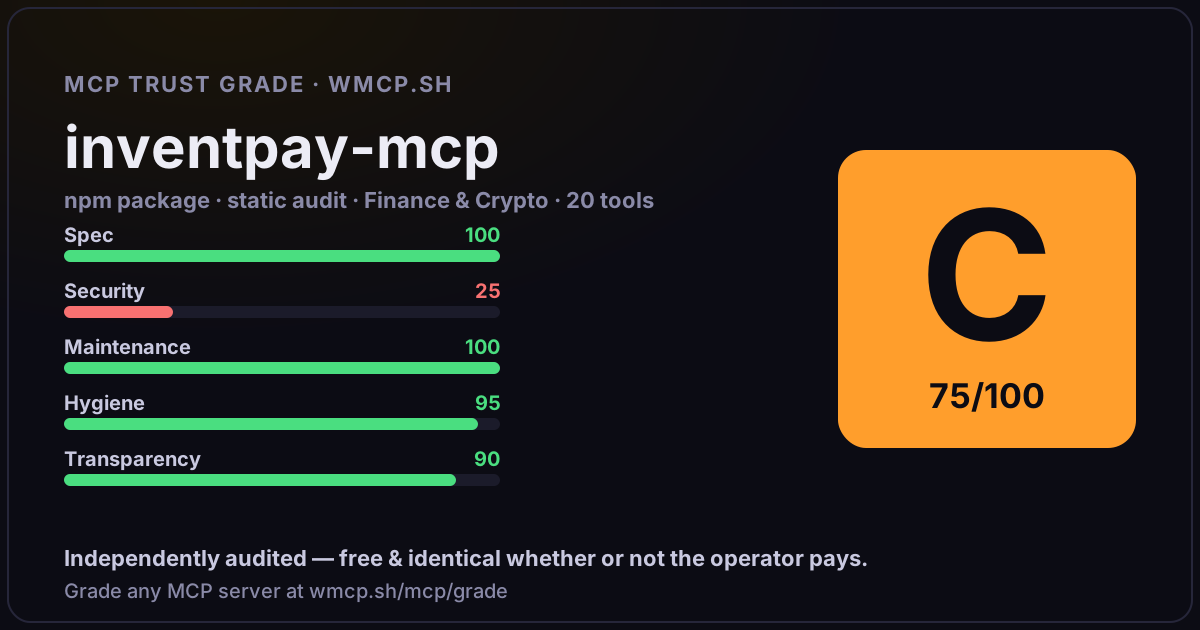
Independent trust grade C (75/100). References sensitive file paths / environment secrets. wmcp.sh continuously watches npm:inventpay-mcp for tool drift and rug-pulls. The grade is free and identical whether or not the operator pays.
What it offers — 20 tools · Finance & Crypto
create_paymentCreate a crypto payment. Returns a unique wallet address, QR code, and invoice URL for the customer to pay.
create_invoiceCreate a multi-currency invoice. The customer can choose which cryptocurrency to pay with. Returns an invoice URL.
get_payment_statusCheck the current status of a payment or invoice. Returns status, amount, confirmations, and transaction details.
get_balancesGet all cryptocurrency balances for your merchant account. Shows available, pending, total earned, and total withdrawn for each currency.
create_withdrawalCreate a withdrawal request to send funds to an external wallet address. Requires INVENTPAY_WITHDRAWAL_KEY to be configured (a separate withdrawal API
get_withdrawalCheck the status of a withdrawal request. Returns status, amount, transaction hash, and processing details.
create_storeCreate a new merchant storefront. Each merchant gets one store with a unique URL slug. Customers can browse and purchase digital products with crypto.
get_storeGet your store details including name, slug, URL, product count, and order count.
update_storeUpdate your store details. Only provided fields are changed.
create_productAdd a digital product to your store. Products are priced in USDT and auto-converted to crypto at checkout. Attach digitalContent for automatic deliver
list_productsList all products in your store with optional search and pagination.
update_productUpdate a product in your store. Only provided fields are changed. Updating the name regenerates the slug.
delete_productDeactivate a product from your store. Products with existing orders are soft-deleted (hidden, not removed).
add_product_keysUpload unique keys/codes to a product
list_product_keysList keys in a product
get_key_pool_statsGet key pool statistics for a product: available, assigned, revoked, and total counts.
list_ordersList all orders for your store with optional status filter and pagination.
get_orderGet full details of a specific order including items, payment status, customer info, and timestamps.
+2 more tools
- ✓ depends on an MCP SDK
- ✓ declares a bin entry (runnable server)
- ✓ 20 tool(s) detected in source
- ⚠ references sensitive file paths / env secrets
- scanned 1 source file
- published within 90 days
- 5 published versions
- ✓ ships TypeScript types
- 2 runtime deps
- ✓ public repository linked
- ✓ MIT license
- 12 weekly downloads
Findings
We re-grade npm:inventpay-mcp on a schedule and alert your Slack/webhook the moment its tools change or its grade drops — rug-pull insurance for the connection.
Share this report card
A 1200×630 card with the grade + audit — drop it in a post, Slack, or your repo.
Embed this grade
A live badge — it re-verifies itself and shows current stability. Static scorecards can't. Paste it in your README or site to show users you're independently audited.

[](https://wmcp.sh/mcp/grade/npm%3Ainventpay-mcp)
<a href="https://wmcp.sh/mcp/grade/npm%3Ainventpay-mcp"><img src="https://wmcp.sh/mcp/grade/npm%3Ainventpay-mcp/badge.svg" alt="MCP Trust Grade C · wmcp.sh"></a>
Agents: check this before connecting
Add the wmcp.sh trust oracle as an MCP server and call grade_mcp_server / check_mcp_drift in your agent's pre-connection gate:
https://wmcp.sh/mcp/trust
readOnly vs observed behavior) layer on via the wmcp.sh proxy.