npm:@nl4ever/sshmcp
Is the npm:@nl4ever/sshmcp MCP server safe to use?
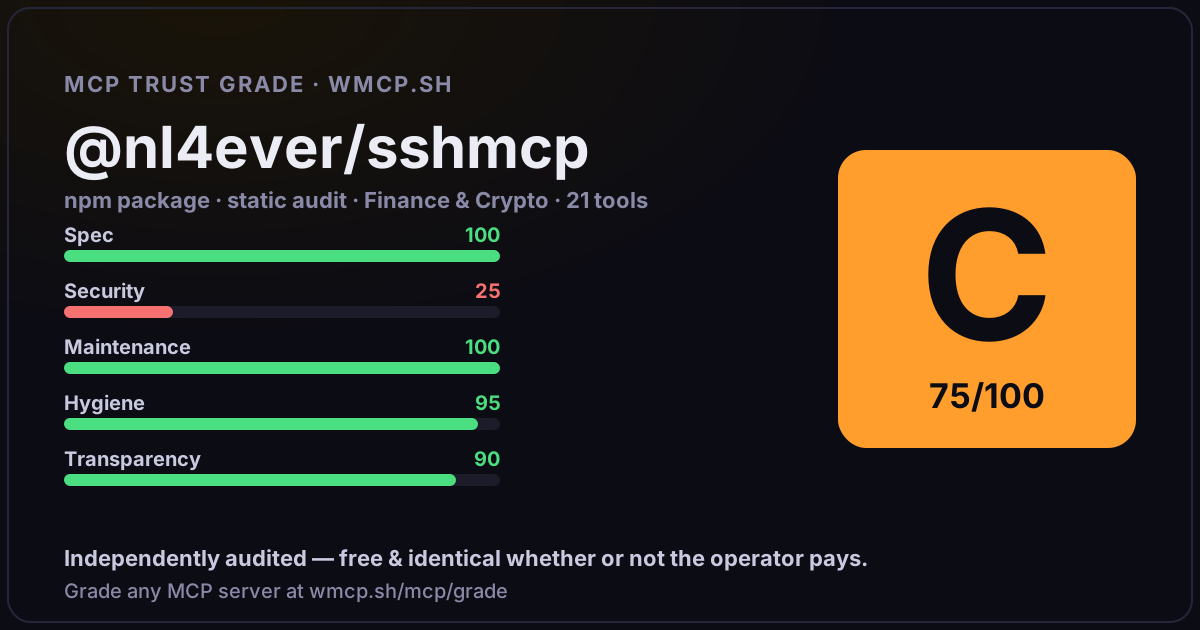
Independent trust grade C (75/100). References sensitive file paths / environment secrets. wmcp.sh continuously watches npm:@nl4ever/sshmcp for tool drift and rug-pulls. The grade is free and identical whether or not the operator pays.
What it offers — 21 tools · Finance & Crypto
list_serversList all configured servers and active connections
get_serverView server configuration details
connectManually connect to server (usually not needed, tools auto-connect)
quick_connectTemporary server connection (not saved). Returns host:port as server_id for subsequent operations
disconnectDisconnect from server
test_connectionTest server connectivity (does not affect existing connections)
executeExecute shell command on remote server
write_fileWrite content to remote file (overwrite)
read_fileRead remote file content (supports line range, suitable for logs and config files)
upload_fileUpload local file to remote server (path-based, zero token cost. Use async mode for large files)
upload_directoryUpload local directory to remote server (auto compress, transfer, and extract. Use async for large dirs)
download_fileDownload file from remote server (use async mode for large files)
download_directoryDownload remote directory (remote compress → download → local extract. Use async for large dirs)
transfer_statusCheck background transfer task progress (use with async_transfer=true)
add_serverAdd or update server configuration
update_serverUpdate server configuration (only pass fields to change, rest unchanged)
delete_serverDelete server configuration
rename_serverRename server ID (alias)
+3 more tools
- ✓ depends on an MCP SDK
- ✓ declares a bin entry (runnable server)
- ✓ 21 tool(s) detected in source
- ⚠ references sensitive file paths / env secrets
- uses eval/exec/child_process (review for unsanitized input)
- scanned 4 source files
- published within 90 days
- 16 published versions
- ✓ ships TypeScript types
- 4 runtime deps
- ✓ public repository linked
- ✓ MIT license
Findings
We re-grade npm:@nl4ever/sshmcp on a schedule and alert your Slack/webhook the moment its tools change or its grade drops — rug-pull insurance for the connection.
Share this report card
A 1200×630 card with the grade + audit — drop it in a post, Slack, or your repo.
Embed this grade
A live badge — it re-verifies itself and shows current stability. Static scorecards can't. Paste it in your README or site to show users you're independently audited.

[](https://wmcp.sh/mcp/grade/npm%3A%40nl4ever%2Fsshmcp)
<a href="https://wmcp.sh/mcp/grade/npm%3A%40nl4ever%2Fsshmcp"><img src="https://wmcp.sh/mcp/grade/npm%3A%40nl4ever%2Fsshmcp/badge.svg" alt="MCP Trust Grade C · wmcp.sh"></a>
Agents: check this before connecting
Add the wmcp.sh trust oracle as an MCP server and call grade_mcp_server / check_mcp_drift in your agent's pre-connection gate:
https://wmcp.sh/mcp/trust
readOnly vs observed behavior) layer on via the wmcp.sh proxy.