trydock.ai
What it offers — 64 tools · Developer Tools
list_workspacesList all workspaces the authenticated principal has access to. Returns workspace name (slug), mode (the default-view preference for the first tab), an
get_workspaceGet details about a specific workspace by its slug, including columns of its primary table surface, member count, and row count. A workspace contains
list_rowsList rows in a workspace's table surface. Returns rows with their data (a JSON object of column-name to value), creation time, the principal who creat
create_rowAppend a new row to a workspace's table surface. The data field is a JSON object with column-name keys. Status column accepts: drafted, queued, sealed
get_rowFetch a single row by id without listing the full table. Useful when a cue payload carries a row id and the agent only needs that one record. Returns
update_rowUpdate specific fields of an existing row. Only the fields provided in `data` are updated; others are preserved. Setting `surface_slug` to a different
delete_rowPermanently delete a row from a workspace. This action cannot be undone.
move_rowsAtomically move N rows from their current sheet(s) to a target sheet inside the same workspace. Use for programmatic data migration: dropping a batch
get_docRead a workspace's doc (TipTap rich-text) body. Format is negotiable via `format`: `markdown` (default — CommonMark + GFM, ready to feed to an LLM or
get_workspace_schemaReturn a table surface's column definitions so an agent knows what keys create_row/update_row will accept. Each column has `key` (the field name in ro
add_columnAppend a single column to a workspace's table schema. Position is auto-computed as next-after-max so the contiguity invariant holds. Key collision (40
list_workspace_membersList principals with explicit access to a workspace. Returns users (id, name, email; email visible only when the caller is in the same org) and agents
delete_workspaceArchive a workspace. Soft-delete: rows, doc body, and activity history are preserved, and the workspace can be restored from Settings · Archived. Ever
update_workspaceRename a workspace, change its slug, switch its default-view mode, or flip its visibility (private | org | unlisted | public). Pass any subset of `nam
share_workspaceInvite a human (by email) to a workspace at a specified role. If the email already belongs to a Dock user they're added immediately and a notification
update_workspace_memberChange an existing workspace member's role. Editor role required to caller. Owner-tier transitions (promoting to or demoting from owner) require an ow
remove_workspace_memberRemove a workspace member. Editor role required; owner-tier removals require an owner caller. Sole-owner removal is blocked; promote someone else firs
update_docReplace a workspace's doc body. Takes EITHER TipTap JSON (`content`) OR Markdown (`markdown`): pass markdown when you're producing prose from scratch
+46 more tools
- ✓ initialize → protocolVersion 2025-06-18
- ✓ initialize HTTP 200
- ✗ unknown method → -32001
- ✓ tools/list → 64 tools
- ✓ every tool has name + inputSchema
- 64 tools scanned
- no injection markup
- no secret-path refs
- single-probe latency 2177ms (PRELIMINARY — continuous uptime/p95 from proxy telemetry lands in v2)
- 94% of tools have typed inputSchema
- 0/64 declare outputSchema
- 15 destructive-by-name tools lack safety annotations
- HTTPS ✓
- RFC 9728 oauth-protected-resource metadata ✓
- advertises protocol 2025-06-18
Observed behavior
No proxied traffic observed for this host yet. Connect it at /connect and its grade gains a measured Reliability score + per-tool behavioral evidence — the half a static scan can't produce.
Findings
We re-grade trydock.ai on a schedule and alert your Slack/webhook the moment its tools change or its grade drops — rug-pull insurance for the connection.
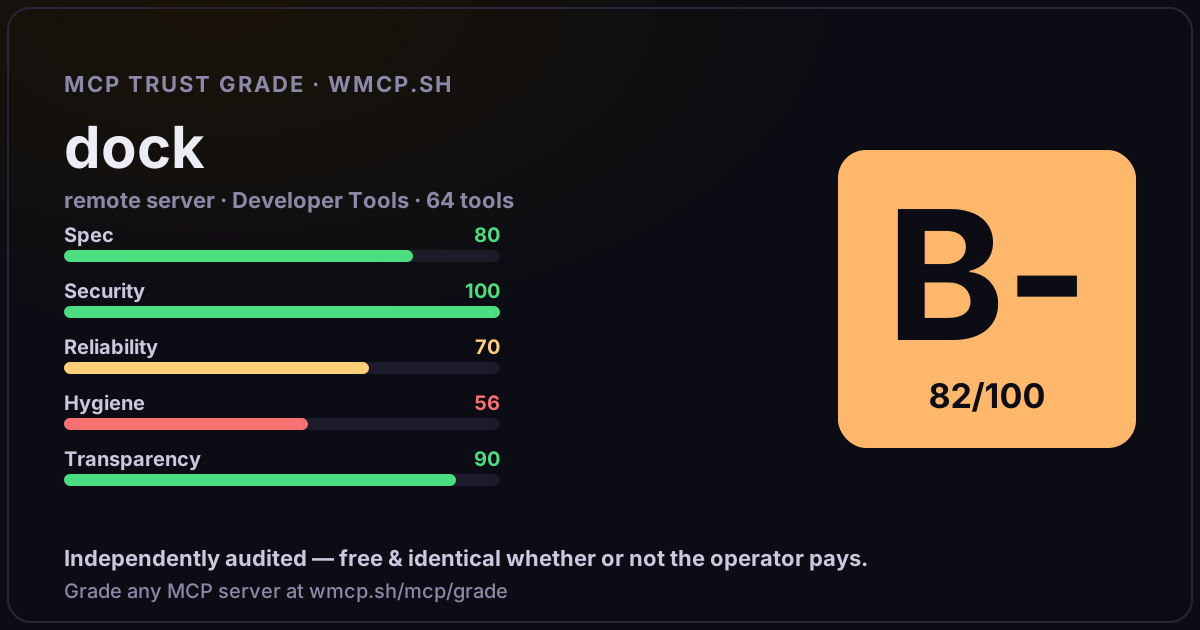
Share this report card
A 1200×630 card with the grade + audit — drop it in a post, Slack, or your repo.
Embed this grade
A live badge — it re-verifies itself and shows current stability. Static scorecards can't. Paste it in your README or site to show users you're independently audited.
[](https://wmcp.sh/mcp/grade/trydock.ai)
<a href="https://wmcp.sh/mcp/grade/trydock.ai"><img src="https://wmcp.sh/mcp/grade/trydock.ai/badge.svg" alt="MCP Trust Grade B- · wmcp.sh"></a>
Agents: check this before connecting
Add the wmcp.sh trust oracle as an MCP server and call grade_mcp_server / check_mcp_drift in your agent's pre-connection gate:
https://wmcp.sh/mcp/trust
readOnly vs observed behavior) layer on via the wmcp.sh proxy.