npm:chrome-debugger-mcp
Is the npm:chrome-debugger-mcp MCP server safe to use?
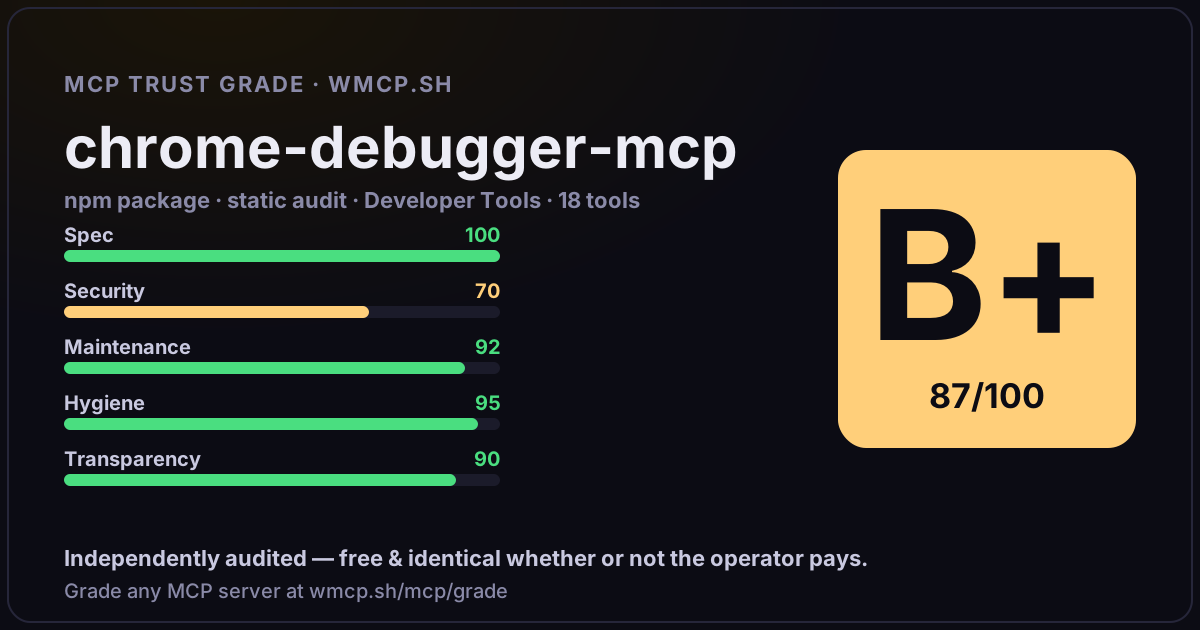
Independent trust grade B+ (87/100). Static analysis of npm package chrome-debugger-mcp@1.0.4 (stdio server — no remote endpoint). Reliability/behavioral signals require running it; not measured. wmcp.sh continuously watches npm:chrome-debugger-mcp for tool drift and rug-pulls. The grade is free and identical whether or not the operator pays.
What it offers — 18 tools · Developer Tools
startDebuggingSessionCALL THIS FIRST whenever browser-side debugging is needed — before any other tool. Auto-trigger when user mentions any of: debug, breakpoint, debugger
launchChrome[STEP 1] Launch a dedicated Chrome instance with remote debugging enabled (default port 9222). Uses --user-data-dir=~/.chrome-debug-profile so your no
listTargets[STEP 2] List all open Chrome tabs available for debugging. MANDATORY: show the full list to the user and ask
connect[STEP 3] Connect the debugger to a specific Chrome tab. MANDATORY: call listTargets first, show the list to the user, wait for their explicit URL conf
disconnectDisconnect the current Chrome debugging session and clear in-memory pause state. Use this to explicitly end a debug session before connecting again.
setBreakpointSet a breakpoint at a specific script URL and line number via CDP — no source code modification needed. Use a full URL (https://...) for exact match,
removeBreakpointRemove a previously set CDP breakpoint by its ID (returned by setBreakpoint).
waitForPause[STEP 5b — FALLBACK] BLOCKING call — waits until ANY debugger pause occurs (breakpoint, debugger; statement, or exception). Before blocking, sends a n
waitForSpecificPause[STEP 5b — PREFERRED] BLOCKING call — waits for the next debugger pause, then checks if it matches the target location. ⚠️ NO AUTO-RESUME: execution s
getScopeVariables[STEP 6a] Read all scope variables (local, closure, module) at the currently paused call frame. Call this immediately after waitForSpecificPause or wa
evaluate[STEP 6b] Evaluate any JavaScript expression in the context of the currently paused call frame. Use this to inspect nested objects, call methods, comp
resume[STEP 8] Resume script execution after collecting all needed variable data — ends the current pause. After calling resume, remove all temporary debugg
stepInto[STEP 7] BLOCKING: step into the next function call, then wait until the debugger pauses again. Follow with getScopeVariables() to observe inner-funct
stepOver[STEP 7] BLOCKING: step over the current statement without entering function calls, then wait until the debugger pauses again. Follow with getScopeVar
stepOut[STEP 7] BLOCKING: step out of the current function and wait until the debugger pauses again in the caller. Use to observe the return value and the st
getStatusNon-blocking: return current connection and pause state immediately without waiting. Use this to poll for pause instead of waitForPause when the MCP c
reloadPage[STEP 5a] Reload the connected page via Chrome DevTools Protocol. More reliable than manual browser refresh — maintains the CDP connection and ensures
forcePauseForce the debugger to pause at the very next JavaScript statement. Useful when you cannot modify source code to add debugger; and setBreakpoint is not
- ✓ depends on an MCP SDK
- ✓ declares a bin entry (runnable server)
- ✓ 18 tool(s) detected in source
- uses eval/exec/child_process (review for unsanitized input)
- scanned 2 source files
- published within 90 days
- 4 published versions
- ✓ ships TypeScript types
- 3 runtime deps
- ✓ public repository linked
- ✓ MIT license
- 20 weekly downloads
Findings
We re-grade npm:chrome-debugger-mcp on a schedule and alert your Slack/webhook the moment its tools change or its grade drops — rug-pull insurance for the connection.
Share this report card
A 1200×630 card with the grade + audit — drop it in a post, Slack, or your repo.
Embed this grade
A live badge — it re-verifies itself and shows current stability. Static scorecards can't. Paste it in your README or site to show users you're independently audited.
[](https://wmcp.sh/mcp/grade/npm%3Achrome-debugger-mcp)
<a href="https://wmcp.sh/mcp/grade/npm%3Achrome-debugger-mcp"><img src="https://wmcp.sh/mcp/grade/npm%3Achrome-debugger-mcp/badge.svg" alt="MCP Trust Grade B+ · wmcp.sh"></a>
Agents: check this before connecting
Add the wmcp.sh trust oracle as an MCP server and call grade_mcp_server / check_mcp_drift in your agent's pre-connection gate:
https://wmcp.sh/mcp/trust
readOnly vs observed behavior) layer on via the wmcp.sh proxy.