npm:can-see
Is the npm:can-see MCP server safe to use?
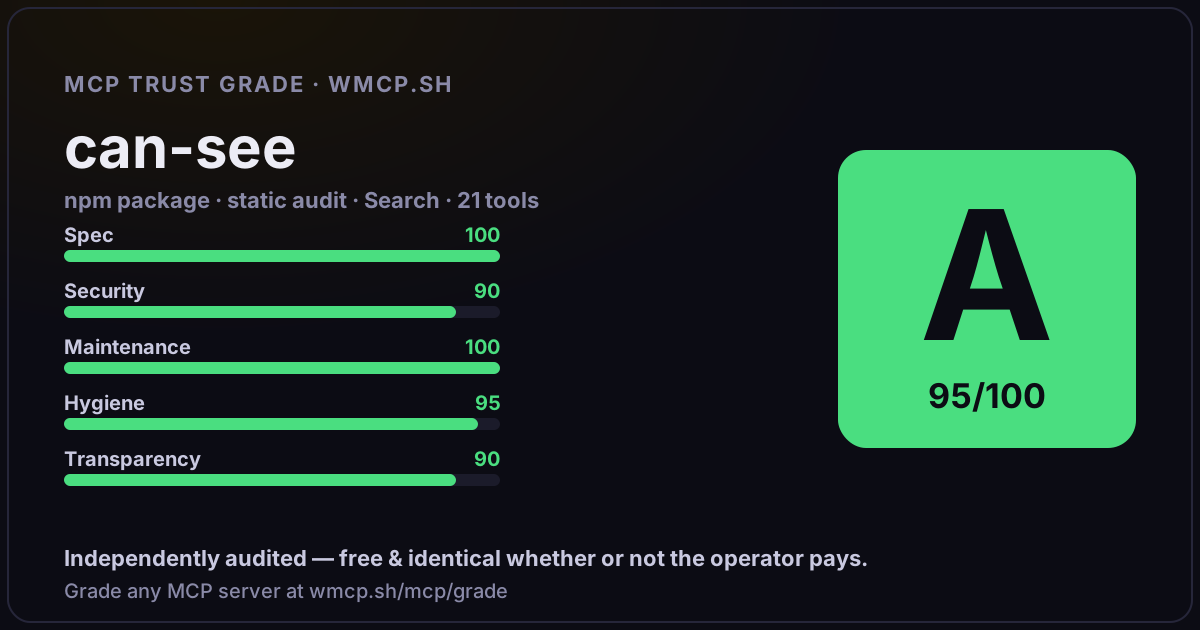
Independent trust grade A (95/100). Static analysis of npm package can-see@0.5.1 (stdio server — no remote endpoint). Reliability/behavioral signals require running it; not measured. wmcp.sh continuously watches npm:can-see for tool drift and rug-pulls. The grade is free and identical whether or not the operator pays.
What it offers — 21 tools · Search
launchLaunch a CLI app in a virtual terminal. IMPORTANT: You MUST call
screenshotCapture the terminal as a PNG image
screenshot_regionCapture a specific rectangular area of the visible terminal as a PNG image
screenshot_text_regionFind text in the viewport and capture the surrounding area as a PNG. Searches visible viewport only (single-line match, returns first match top-to-bot
capture_baselineSnapshot current terminal state for later diff comparison (screenshot also auto-captures a baseline)
diff_screenshotCompare current terminal state against the baseline, return PNG with changed cells highlighted in red
get_cell_infoQuery character, colors, and text attributes at a specific cell or range of cells
read_scrollbackRead text that has scrolled above the visible terminal viewport
start_recordingBegin capturing terminal frames for an animated GIF (frames captured on output, not fixed interval)
stop_recordingStop recording and return the captured frames as an animated GIF. If the GIF exceeds the inline size limit (~4MB), frames are automatically trimmed. I
read_textRead the terminal buffer as plain text (for programmatic assertions instead of visual screenshots)
wait_for_textWait until specific text appears in the terminal buffer (replaces sleep-and-screenshot polling)
wait_for_idleWait until terminal output has been stable for a given duration. Use idleMs (default) for apps that stop producing output, or stableMs for apps with c
wait_for_colorWait until a specific color appears at a position (or anywhere in the viewport)
wait_for_exitWait until the process exits and return its exit code and signal
send_keysSend keystrokes to the app (e.g.,
send_textType a string of text into the app
get_process_statusGet the current process status — use to distinguish
+3 more tools
- ✓ depends on an MCP SDK
- ✓ declares a bin entry (runnable server)
- ✓ 21 tool(s) detected in source
- no high-risk patterns in sampled source
- scanned 6 source files
- published within 90 days
- 9 published versions
- ✓ ships TypeScript types
- 7 runtime deps
- ✓ public repository linked
- ✓ MIT license
- 129 weekly downloads
Findings
We re-grade npm:can-see on a schedule and alert your Slack/webhook the moment its tools change or its grade drops — rug-pull insurance for the connection.
Share this report card
A 1200×630 card with the grade + audit — drop it in a post, Slack, or your repo.
Embed this grade
A live badge — it re-verifies itself and shows current stability. Static scorecards can't. Paste it in your README or site to show users you're independently audited.

[](https://wmcp.sh/mcp/grade/npm%3Acan-see)
<a href="https://wmcp.sh/mcp/grade/npm%3Acan-see"><img src="https://wmcp.sh/mcp/grade/npm%3Acan-see/badge.svg" alt="MCP Trust Grade A · wmcp.sh"></a>
Agents: check this before connecting
Add the wmcp.sh trust oracle as an MCP server and call grade_mcp_server / check_mcp_drift in your agent's pre-connection gate:
https://wmcp.sh/mcp/trust
readOnly vs observed behavior) layer on via the wmcp.sh proxy.