npm:android-mcp-server
Is the npm:android-mcp-server MCP server safe to use?
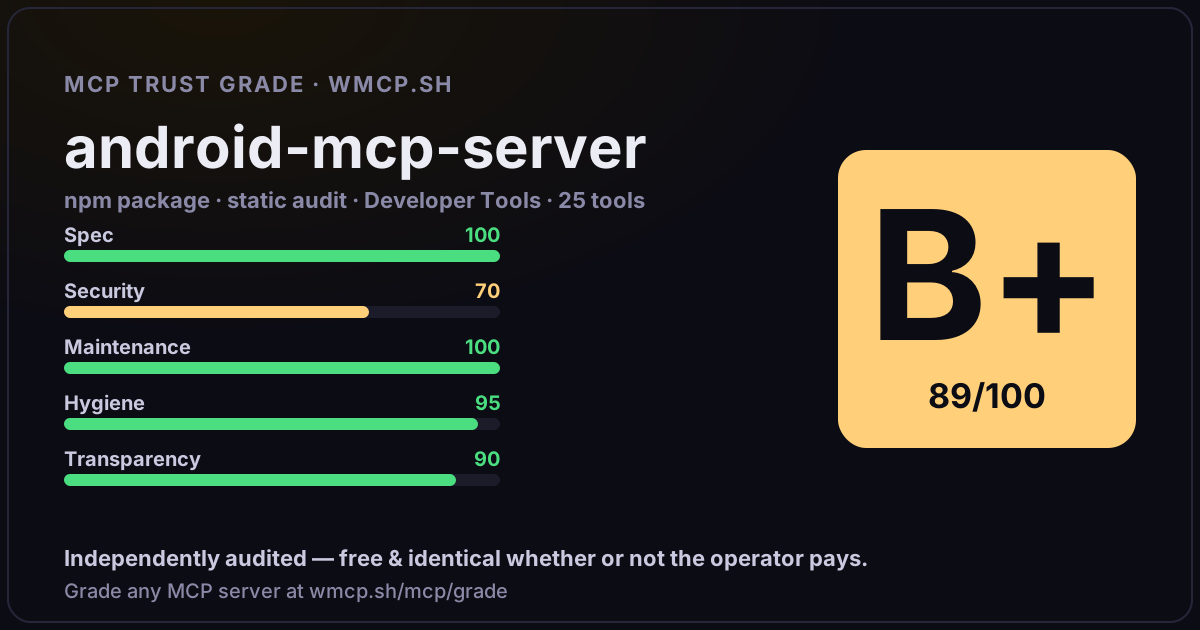
Independent trust grade B+ (89/100). Static analysis of npm package android-mcp-server@1.3.0 (stdio server — no remote endpoint). Reliability/behavioral signals require running it; not measured. wmcp.sh continuously watches npm:android-mcp-server for tool drift and rug-pulls. The grade is free and identical whether or not the operator pays.
What it offers — 25 tools · Developer Tools
list_devicesList connected Android devices and emulators
list_avdsList available Android Virtual Devices
start_emulatorStart an Android emulator. Waits up to 60s for it to come online.
screenshotTake a screenshot of the Android device. Returns the image for visual analysis. Optionally saves to a file path.
get_ui_treeGet the UI element hierarchy of the current screen. Returns interactive elements with their bounds, text, resource IDs, and state. Use this to find el
tapTap at specific screen coordinates
tap_elementTap a UI element by its resource-id, text, or content-desc. Finds the element in the UI tree and taps its center.
tap_and_waitTap element then wait for UI to settle and return the new UI tree. Combines tap + wait + get_ui_tree into a single fast operation.
type_textType text into the currently focused input field
press_keyPress a hardware/software key
swipePerform a swipe gesture on the screen
long_pressLong press at screen coordinates. Useful for context menus, drag handles, and press-and-hold interactions.
double_tapDouble tap at screen coordinates. Useful for zoom-in gestures and double-tap interactions.
multi_tapTap at the same coordinates multiple times with a fixed interval. Use for spam-tapping, incrementing counters, or testing rapid repeat actions.
tap_sequenceExecute a multi-step action sequence. Supports taps, waits, text input, key presses, and swipes in any order.
scroll_to_elementScroll down repeatedly until an element matching the given criteria is visible
wait_for_elementWait for a UI element to appear on screen. Polls every 500ms.
launch_appLaunch an Android app by package name
+7 more tools
- ✓ depends on an MCP SDK
- ✓ declares a bin entry (runnable server)
- ✓ 25 tool(s) detected in source
- uses eval/exec/child_process (review for unsanitized input)
- scanned 2 source files
- published within 90 days
- 5 published versions
- ✓ ships TypeScript types
- 3 runtime deps
- ✓ public repository linked
- ✓ MIT license
- 234 weekly downloads
Findings
We re-grade npm:android-mcp-server on a schedule and alert your Slack/webhook the moment its tools change or its grade drops — rug-pull insurance for the connection.
Share this report card
A 1200×630 card with the grade + audit — drop it in a post, Slack, or your repo.
Embed this grade
A live badge — it re-verifies itself and shows current stability. Static scorecards can't. Paste it in your README or site to show users you're independently audited.
[](https://wmcp.sh/mcp/grade/npm%3Aandroid-mcp-server)
<a href="https://wmcp.sh/mcp/grade/npm%3Aandroid-mcp-server"><img src="https://wmcp.sh/mcp/grade/npm%3Aandroid-mcp-server/badge.svg" alt="MCP Trust Grade B+ · wmcp.sh"></a>
Agents: check this before connecting
Add the wmcp.sh trust oracle as an MCP server and call grade_mcp_server / check_mcp_drift in your agent's pre-connection gate:
https://wmcp.sh/mcp/trust
readOnly vs observed behavior) layer on via the wmcp.sh proxy.