npm:@securecode/mcp-server
Is the npm:@securecode/mcp-server MCP server safe to use?
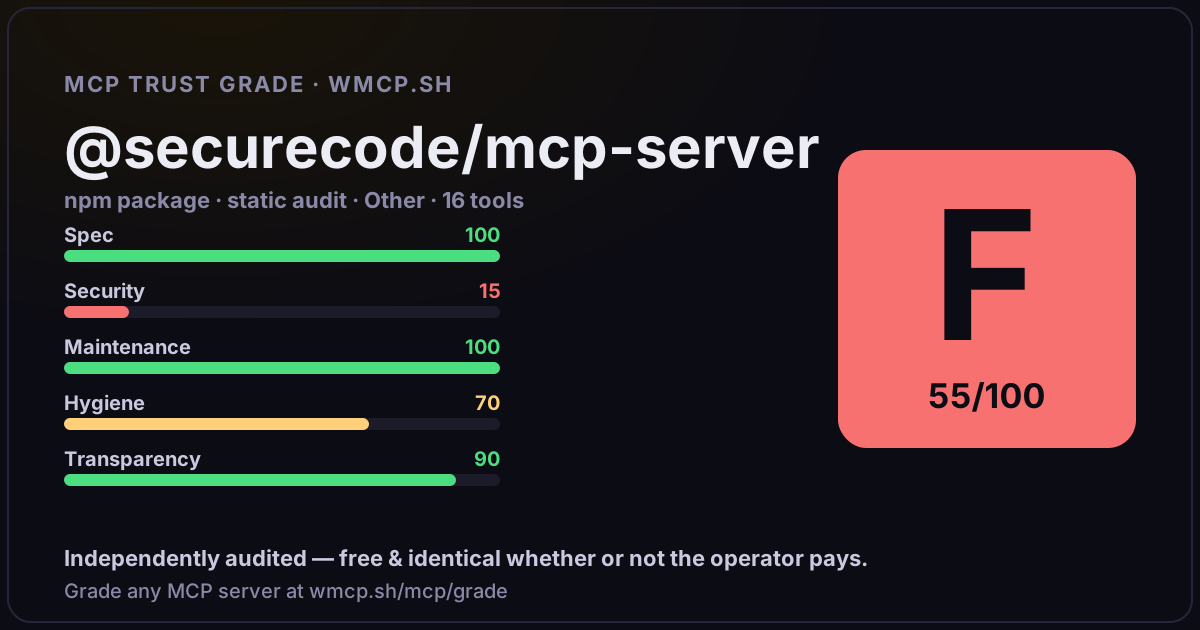
Independent trust grade F (55/100). Prompt-injection / hidden-instruction markup found in package source. wmcp.sh continuously watches npm:@securecode/mcp-server for tool drift and rug-pulls. The grade is free and identical whether or not the operator pays.
What it offers — 16 tools · Other
get-secretGet a secret by name. By default, injects the value into a local file so it never appears in the AI conversation. Use reveal:true to see the raw value
list-secretsList all available secrets with their tags and expiration status. Returns names and metadata, never values.
create-secretCreate a new secret. Secrets with the same name can coexist if they have different env tags.
renew-secretRenew an expired secret or change its TTL. Use this to reactivate expired secrets or extend expiration.
delete-secretDelete a secret (soft delete, can be recovered)
update-secretUpdate an existing secret
import-envImport secrets from .env files into SecureCode. For security, .env import must be done through the web interface \u2014 the AI agent never sees secret
export-envExport all secrets as .env or CSV format. Returns the full content with decrypted values.
get-statusGet your SecureCodeHQ account status: plan, usage limits, secrets count, and MCP server version. Useful to check remaining capacity and verify the ser
wake-sessionWake (unlock) the session to start accessing secrets. Optionally restrict access to specific tag scope and set auto-sleep timer.
sleep-sessionLock the session immediately. All secret access will be blocked until you wake it again. Use this when you finish working.
session-statusCheck the current session status: active or sleeping, scope restrictions, and time remaining before auto-sleep.
byebyeEnd your work session. Locks the session, cleans up all injected secrets from disk, and says goodbye. Use this when you finish working for the day.
get-active-rulesList active MCP access rules. Read-only \u2014 rules can only be created or modified from the dashboard. Use this to understand why access to a secret
onboardStart or continue the SecureCode onboarding. Guides the user through signup, .env import, API key creation, MCP configuration, and optional SDK setup
security-checkAnalyze the project for security issues after SecureCode setup. Returns a list of actions the agent MUST execute to protect secrets. Call this after S
- ✓ depends on an MCP SDK
- ✓ declares a bin entry (runnable server)
- ✓ 16 tool(s) detected in source
- ⚠ prompt-injection / hidden-instruction markup in source
- ⚠ references sensitive file paths / env secrets
- scanned 1 source file
- published within 90 days
- 23 published versions
- no TypeScript types
- 2 runtime deps
- ✓ public repository linked
- ✓ MIT license
- 50 weekly downloads
Findings
We re-grade npm:@securecode/mcp-server on a schedule and alert your Slack/webhook the moment its tools change or its grade drops — rug-pull insurance for the connection.
Share this report card
A 1200×630 card with the grade + audit — drop it in a post, Slack, or your repo.
Embed this grade
A live badge — it re-verifies itself and shows current stability. Static scorecards can't. Paste it in your README or site to show users you're independently audited.
[](https://wmcp.sh/mcp/grade/npm%3A%40securecode%2Fmcp-server)
<a href="https://wmcp.sh/mcp/grade/npm%3A%40securecode%2Fmcp-server"><img src="https://wmcp.sh/mcp/grade/npm%3A%40securecode%2Fmcp-server/badge.svg" alt="MCP Trust Grade F · wmcp.sh"></a>
Agents: check this before connecting
Add the wmcp.sh trust oracle as an MCP server and call grade_mcp_server / check_mcp_drift in your agent's pre-connection gate:
https://wmcp.sh/mcp/trust
readOnly vs observed behavior) layer on via the wmcp.sh proxy.