npm:@pictify/mcp-server
Is the npm:@pictify/mcp-server MCP server safe to use?
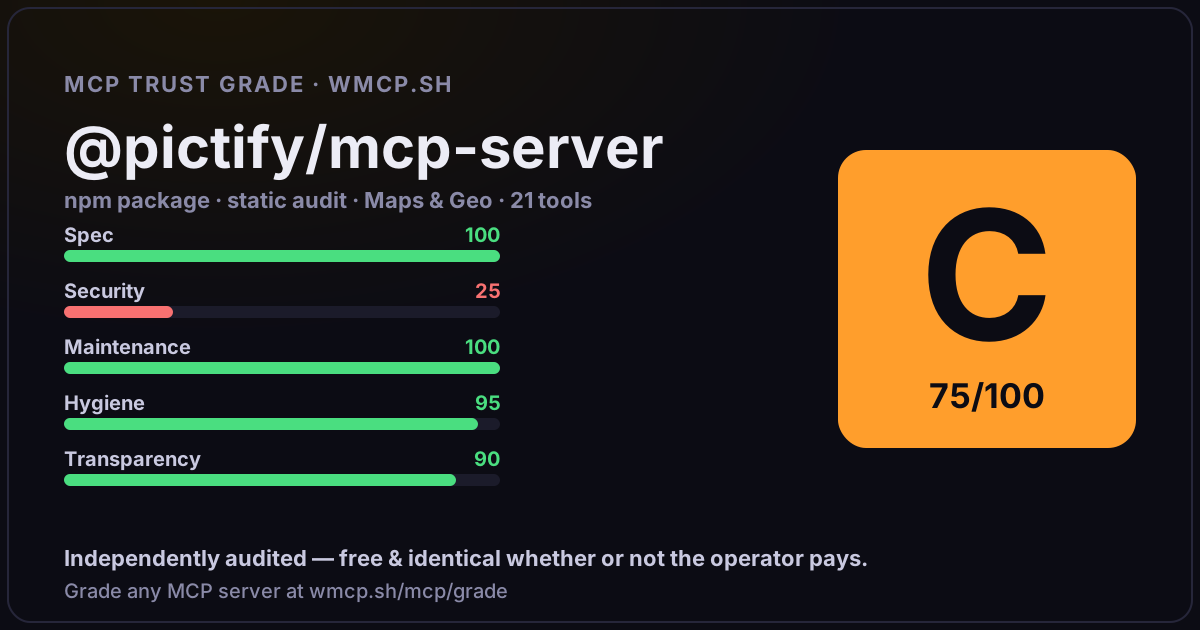
Independent trust grade C (75/100). References sensitive file paths / environment secrets. wmcp.sh continuously watches npm:@pictify/mcp-server for tool drift and rug-pulls. The grade is free and identical whether or not the operator pays.
What it offers — 21 tools · Maps & Geo
pictify_batch_renderStart a batch render job to generate multiple images from a single template — from inline variable sets, or from a hosted CSV where every row becomes
pictify_get_batch_resultsCheck the status and results of a batch render job.
pictify_cancel_batchCancel a running batch render job.
pictify_list_experimentsList A/B test experiments with optional filtering by type and status.
pictify_create_experimentCreate a new experiment to test different image variants.
pictify_get_experimentGet detailed information about a specific experiment.
pictify_get_experiment_quotaCheck experiment usage and limits for your current plan.
pictify_update_experimentUpdate an existing experiment. Available fields depend on the current status:\n
pictify_delete_experimentSoft-delete an experiment. This cannot be undone.
pictify_start_experimentStart a draft or paused experiment, activating traffic routing to its variants.
pictify_pause_experimentPause a running experiment, temporarily stopping traffic routing and event tracking.
pictify_complete_experimentComplete an experiment by declaring a winning variant.
pictify_track_experiment_eventsTrack impressions, views, clicks, and conversions for experiments.
pictify_create_gifCreate an animated GIF from HTML content with CSS animations, a URL, or a template.
pictify_capture_gifRecord an animated GIF from a live web page URL by capturing its on-screen activity over time.
pictify_list_gifsList previously generated GIFs from your account with pagination.
pictify_get_gifGet details of a specific GIF by its UID. No authentication required.
pictify_create_imageGenerate a static image (PNG, JPEG, or WebP) from HTML/CSS content, a URL screenshot, or a template.
+3 more tools
- ✓ depends on an MCP SDK
- ✓ declares a bin entry (runnable server)
- ✓ 21 tool(s) detected in source
- ⚠ references sensitive file paths / env secrets
- scanned 6 source files
- published within 90 days
- 8 published versions
- ✓ ships TypeScript types
- 5 runtime deps
- ✓ public repository linked
- ✓ MIT license
- 74 weekly downloads
Findings
We re-grade npm:@pictify/mcp-server on a schedule and alert your Slack/webhook the moment its tools change or its grade drops — rug-pull insurance for the connection.
Share this report card
A 1200×630 card with the grade + audit — drop it in a post, Slack, or your repo.
Embed this grade
A live badge — it re-verifies itself and shows current stability. Static scorecards can't. Paste it in your README or site to show users you're independently audited.

[](https://wmcp.sh/mcp/grade/npm%3A%40pictify%2Fmcp-server)
<a href="https://wmcp.sh/mcp/grade/npm%3A%40pictify%2Fmcp-server"><img src="https://wmcp.sh/mcp/grade/npm%3A%40pictify%2Fmcp-server/badge.svg" alt="MCP Trust Grade C · wmcp.sh"></a>
Agents: check this before connecting
Add the wmcp.sh trust oracle as an MCP server and call grade_mcp_server / check_mcp_drift in your agent's pre-connection gate:
https://wmcp.sh/mcp/trust
readOnly vs observed behavior) layer on via the wmcp.sh proxy.