npm:@ezstats/ezstats-mcp
Is the npm:@ezstats/ezstats-mcp MCP server safe to use?
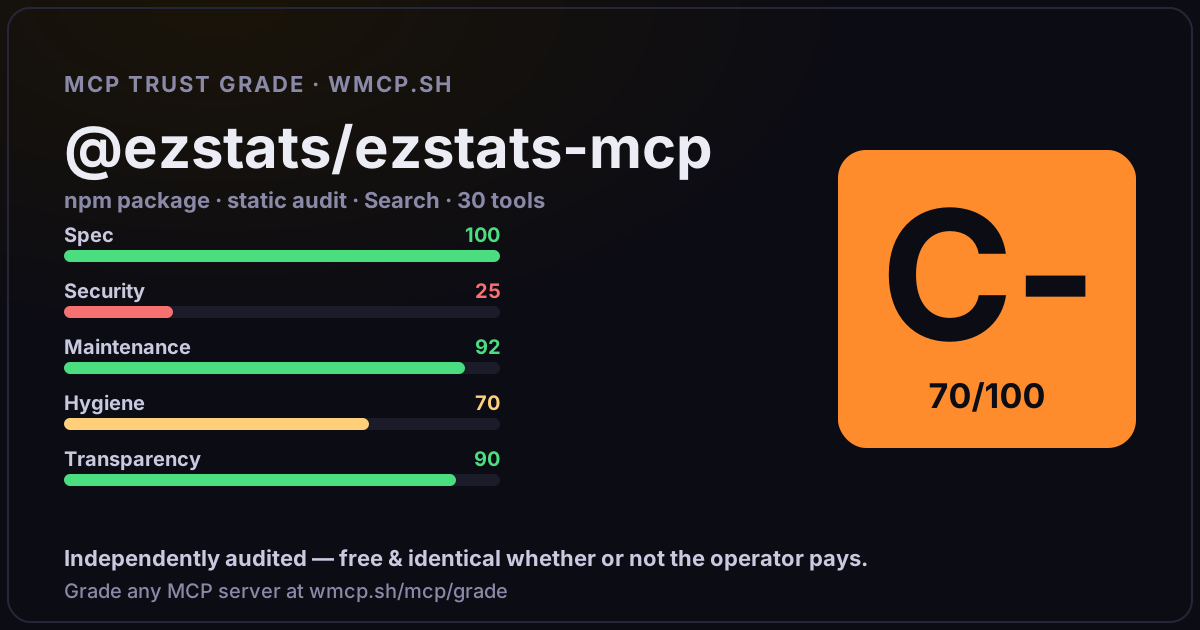
Independent trust grade D (67/100). References sensitive file paths / environment secrets. wmcp.sh continuously watches npm:@ezstats/ezstats-mcp for tool drift and rug-pulls. The grade is free and identical whether or not the operator pays.
What it offers — 30 tools · Search
create_accountCreate a new ezStats account, optionally the first site, and prepare billing setup. Use this only before an API key exists.
list_sitesList the sites the authenticated ezStats user can access. Use this when you need to discover available domains or look up a site_id.
find_site_by_domainFind a site by domain name and return its site_id and metadata.
create_siteCreate a site under the authenticated ezStats account and return a ready-to-install tracking snippet.
get_tracking_snippetReturn the ezStats tracking code for a site in a platform-specific format.
verify_trackingCheck whether ezStats is receiving live tracking data for a site.
get_onboarding_statusReturn the remaining setup steps for a site, including tracking, Search Console, goals, alerts, and billing.
connect_search_consoleStart the human-gated Google Search Console connection flow for a site.
get_search_console_statusCheck whether Google Search Console is connected for a site.
rotate_api_keyRotate the current ezStats API key and keep the old key valid for 24 hours.
get_site_overviewGet a summary of website traffic for a date range, including visitors, pageviews, bounce rate, and pages per visit.
get_top_pagesGet the top-performing pages for a site, including trend and change versus the previous period.
get_traffic_sourcesGet the leading traffic sources and channel mix for a site.
get_realtime_visitorsGet the current realtime visitor count, active pages, and leading live traffic sources.
get_recent_visitsGet recent visitor session summaries for a site, including landing pages, sources, device details, timing, and page sequences.
get_goalsReturn goal conversion performance for a site.
get_seo_overviewReturn Search Console clicks, impressions, CTR, and top queries for a site.
get_keywordsReturn tracked keywords and ranking movement for a site.
+12 more tools
- ✓ depends on an MCP SDK
- ✓ declares a bin entry (runnable server)
- ✓ 30 tool(s) detected in source
- ⚠ references sensitive file paths / env secrets
- scanned 6 source files
- last published ~4mo ago
- 2 published versions
- no TypeScript types
- 3 runtime deps
- ✓ public repository linked
- ✓ MIT license
- 61 weekly downloads
Findings
We re-grade npm:@ezstats/ezstats-mcp on a schedule and alert your Slack/webhook the moment its tools change or its grade drops — rug-pull insurance for the connection.
Share this report card
A 1200×630 card with the grade + audit — drop it in a post, Slack, or your repo.
Embed this grade
A live badge — it re-verifies itself and shows current stability. Static scorecards can't. Paste it in your README or site to show users you're independently audited.
[](https://wmcp.sh/mcp/grade/npm%3A%40ezstats%2Fezstats-mcp)
<a href="https://wmcp.sh/mcp/grade/npm%3A%40ezstats%2Fezstats-mcp"><img src="https://wmcp.sh/mcp/grade/npm%3A%40ezstats%2Fezstats-mcp/badge.svg" alt="MCP Trust Grade D · wmcp.sh"></a>
Agents: check this before connecting
Add the wmcp.sh trust oracle as an MCP server and call grade_mcp_server / check_mcp_drift in your agent's pre-connection gate:
https://wmcp.sh/mcp/trust
readOnly vs observed behavior) layer on via the wmcp.sh proxy.