meetlark.ai
What it offers — 6 tools · Finance & Crypto
meetlark_create_pollCreate a scheduling poll to find a time that works for a group. Returns an admin URL (keep private) and a participation URL (share with participants).
meetlark_get_resultsGet poll details and available time slots using a participation token. Returns the poll title, description, status, and time slots -- but NOT votes or
meetlark_voteCast a vote on a scheduling poll. Each time slot can be voted yes, maybe, or no. Requires participant name and email. Use the participation token from
meetlark_get_admin_viewGet full poll details including all votes and participants. This is the only way to see who voted and how they voted. Returns poll info, time slots, e
meetlark_close_pollClose a poll to stop accepting new votes. Use the admin token from poll creation.
meetlark_reopen_pollReopen a previously closed poll to accept votes again. Use the admin token from poll creation.
- ✓ initialize → protocolVersion 2025-06-18
- ✓ initialize HTTP 200
- ✓ unknown method → -32601
- ✓ tools/list → 6 tools
- ✓ every tool has name + inputSchema
- 6 tools scanned
- no injection markup
- no secret-path refs
- single-probe latency 987ms (PRELIMINARY — continuous uptime/p95 from proxy telemetry lands in v2)
- 100% of tools have typed inputSchema
- 0/6 declare outputSchema
- no unannotated destructive tools
- HTTPS ✓
- advertises protocol 2025-06-18
Observed behavior
No proxied traffic observed for this host yet. Connect it at /connect and its grade gains a measured Reliability score + per-tool behavioral evidence — the half a static scan can't produce.
Findings
We re-grade meetlark.ai on a schedule and alert your Slack/webhook the moment its tools change or its grade drops — rug-pull insurance for the connection.
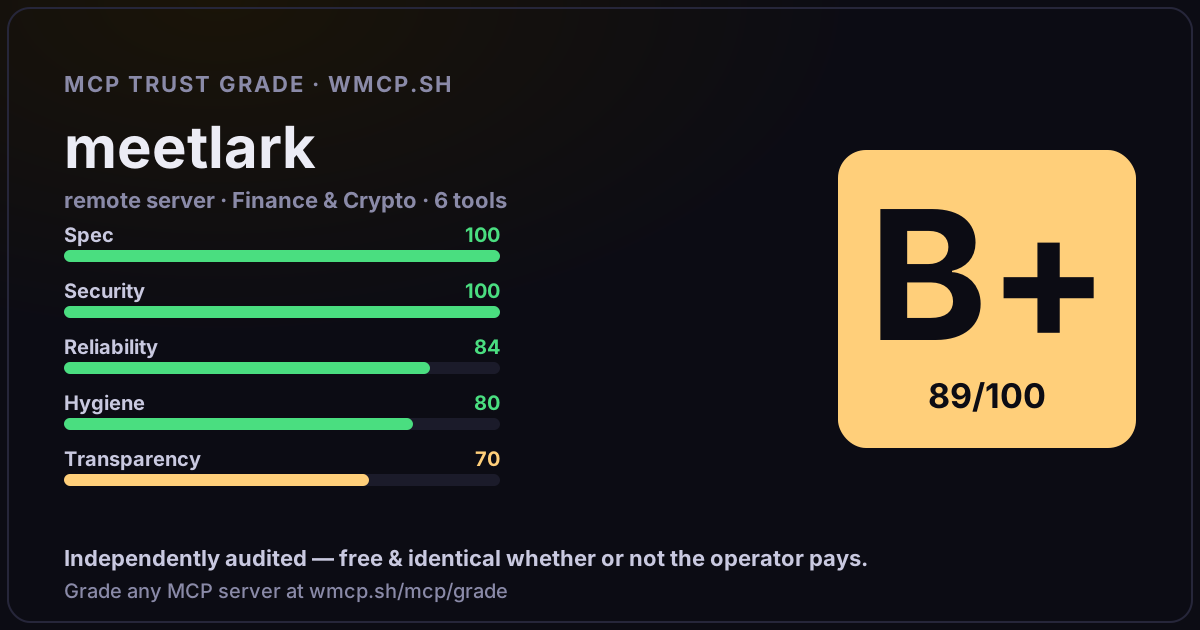
Share this report card
A 1200×630 card with the grade + audit — drop it in a post, Slack, or your repo.
Embed this grade
A live badge — it re-verifies itself and shows current stability. Static scorecards can't. Paste it in your README or site to show users you're independently audited.

[](https://wmcp.sh/mcp/grade/meetlark.ai)
<a href="https://wmcp.sh/mcp/grade/meetlark.ai"><img src="https://wmcp.sh/mcp/grade/meetlark.ai/badge.svg" alt="MCP Trust Grade B+ · wmcp.sh"></a>
Agents: check this before connecting
Add the wmcp.sh trust oracle as an MCP server and call grade_mcp_server / check_mcp_drift in your agent's pre-connection gate:
https://wmcp.sh/mcp/trust
readOnly vs observed behavior) layer on via the wmcp.sh proxy.