mcp.sheetsdata.com
What it offers — 12 tools · Developer Tools
search_partsSearch for electronic components by part number, description, or keyword. Start here — this is the best entry point for finding components. Queries al
search_datasheetsSemantic search across all extracted datasheets. Finds components matching natural language queries about specifications, features, or capabilities. B
prefetch_datasheetsTrigger background datasheet extraction for multiple parts at once (up to 20). Non-blocking — returns immediately with the status of each part. Use th
check_extraction_statusCheck the extraction status of one or more parts. Free. Each entry includes the current extraction step, elapsed seconds, and document ID. Use after p
get_part_detailsGet full details for a specific electronic component by manufacturer part number (MPN) or LCSC number. Returns specs, pricing, and stock from all conf
read_datasheetRead from a component's datasheet. Two modes: **Section mode** (default): Returns a named section. Start with section='summary' to get an overview and
compare_partsCompare 2-5 electronic components side by side in a single call. For each part, returns merged provider data (pricing, stock, structured parameters, p
check_design_fitValidate whether a component will work within your operating conditions. Compares your design parameters against the datasheet's absolute maximum rati
analyze_imageAnalyze an image from a component's datasheet using vision AI. Use this when read_datasheet returns a section containing images and you need to extrac
find_alternativeFind alternative / second-source components for a given MPN. Returns parts ranked by how closely their specs, package, and category match the referenc
request_datasheet_uploadRequest a signed URL to upload a datasheet PDF for a component whose datasheet we don't have. Use this when search_parts / get_part_details / prefetch
confirm_datasheet_uploadConfirm a datasheet upload started via request_datasheet_upload. Pass the upload_token you got back from the request step. The server downloads the up
- ✓ initialize → protocolVersion 2025-06-18
- ✓ initialize HTTP 200
- ✗ unknown method → no JSON-RPC error
- ✓ tools/list → 12 tools
- ✓ every tool has name + inputSchema
- 12 tools scanned
- no injection markup
- no secret-path refs
- single-probe latency 3616ms (PRELIMINARY — continuous uptime/p95 from proxy telemetry lands in v2)
- 100% of tools have typed inputSchema
- 0/12 declare outputSchema
- no unannotated destructive tools
- HTTPS ✓
- RFC 9728 oauth-protected-resource metadata ✓
- advertises protocol 2025-06-18
Observed behavior
No proxied traffic observed for this host yet. Connect it at /connect and its grade gains a measured Reliability score + per-tool behavioral evidence — the half a static scan can't produce.
Findings
We re-grade mcp.sheetsdata.com on a schedule and alert your Slack/webhook the moment its tools change or its grade drops — rug-pull insurance for the connection.
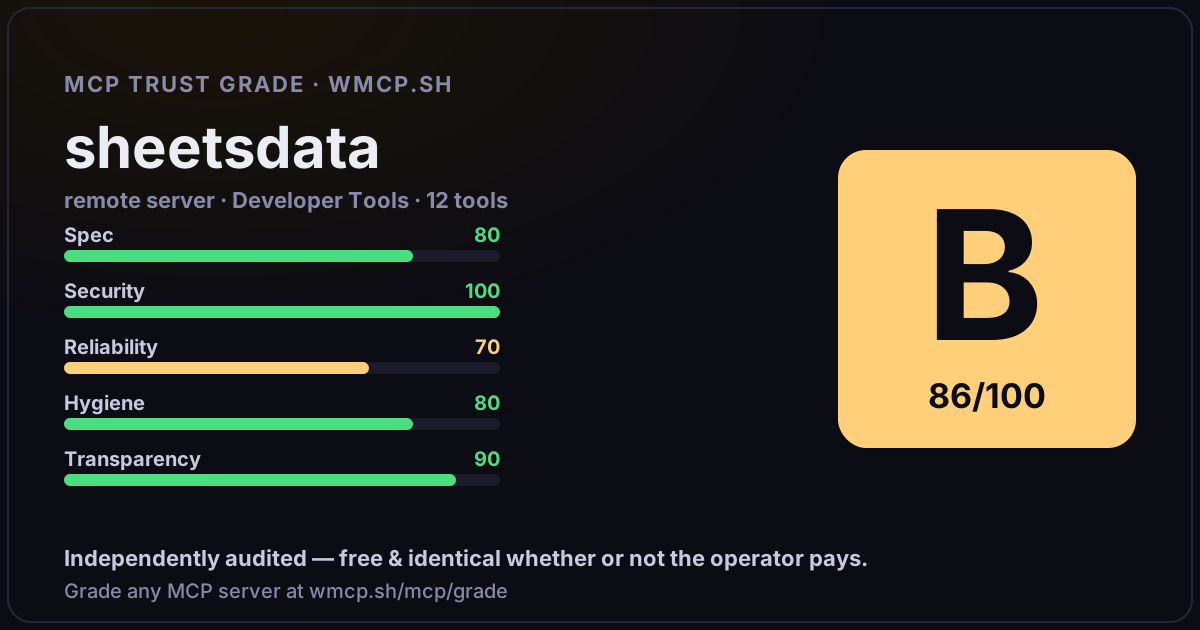
Share this report card
A 1200×630 card with the grade + audit — drop it in a post, Slack, or your repo.
Embed this grade
A live badge — it re-verifies itself and shows current stability. Static scorecards can't. Paste it in your README or site to show users you're independently audited.

[](https://wmcp.sh/mcp/grade/mcp.sheetsdata.com)
<a href="https://wmcp.sh/mcp/grade/mcp.sheetsdata.com"><img src="https://wmcp.sh/mcp/grade/mcp.sheetsdata.com/badge.svg" alt="MCP Trust Grade B · wmcp.sh"></a>
Agents: check this before connecting
Add the wmcp.sh trust oracle as an MCP server and call grade_mcp_server / check_mcp_drift in your agent's pre-connection gate:
https://wmcp.sh/mcp/trust
readOnly vs observed behavior) layer on via the wmcp.sh proxy.