mailbox.bot
What it offers — 29 tools · Developer Tools
get_mailboxGet your agent's managed receiving endpoint when the account has access to managed receiving. For generally available inbound context, use list_inboun
list_packagesList inbound packages for approved managed receiving/package accounts with optional filters by status, carrier, and date. Returns tracking number, car
get_packageGet full package details including photos, tracking events, shipping label data (carrier, addresses, weight), forwarding status, storage location, and
get_package_photosGet photos for a package with OCR-extracted text and confidence scores. Filter by photo type to get only exterior shots, label closeups, barcode scans
request_actionRequest a physical action on a package at the facility. Actions include forwarding to another address, shredding, scanning documents, holding for pick
request_scanRequest document scanning (OCR + structured data extraction) for a package. The facility will scan the document and extract text, addresses, dates, an
get_scan_resultsGet document scan results including raw OCR text, structured data fields (addresses, dates, amounts), and confidence scores. Returns empty if scan is
add_tagAdd a tag/label to a package for categorization and filtering. Tags are free-form strings. Adding the same tag twice is a no-op.
add_noteAdd an observation or context note to a package. Notes are visible to the facility operator and the renter. Use for recording decisions, observations,
create_ruleCreate a standing instruction that auto-triggers actions when incoming packages match conditions. Rules run on every new package and execute the speci
register_expectedPre-register an expected inbound shipment so it is auto-matched when it arrives at the facility. Optionally specify an action to auto-execute on arriv
get_usageGet usage summary and billing events for a time period. Returns itemized events (scans, forwards, mail sends) with costs, plus period totals. Defaults
list_inbound_forwarding_addressesList the renter’s private inbound forwarding aliases on forward.mailbox.bot. These are the unique intake email addresses an operator, assistant, provi
list_inbound_mailList forwarded inbound mail items captured from private forwarding aliases. Default output includes compact draft_context so an LLM or external agent
get_inbound_mailGet one forwarded inbound mail item with compact draft_context by default. Use this before drafting an outbound reply when you need sender context, re
list_postal_threadsList physical-mail threads that group inbound mail context, human review, and outbound sends. Use this to understand which inbound items and outbound
get_postal_threadGet one physical-mail thread with optional timeline events. Use this to explain how a generated outbound mail piece relates back to prior inbound scan
update_actionPush notes, structured data, or a clarification response to an existing action request. Use this to add agent reasoning, attach extracted data, or res
+11 more tools
- ✗ initialize → protocolVersion 2025-11-25
- ✓ initialize HTTP 200
- ✗ unknown method → -32000
- ✓ tools/list → 29 tools
- ✓ every tool has name + inputSchema
- 29 tools scanned
- no injection markup
- no secret-path refs
- single-probe latency 2604ms (PRELIMINARY — continuous uptime/p95 from proxy telemetry lands in v2)
- 90% of tools have typed inputSchema
- 29/29 declare outputSchema
- 4 destructive-by-name tools lack safety annotations
- HTTPS ✓
- RFC 9728 oauth-protected-resource metadata ✓
- advertises protocol 2025-11-25
Observed behavior
No proxied traffic observed for this host yet. Connect it at /connect and its grade gains a measured Reliability score + per-tool behavioral evidence — the half a static scan can't produce.
Findings
We re-grade mailbox.bot on a schedule and alert your Slack/webhook the moment its tools change or its grade drops — rug-pull insurance for the connection.
Share this report card
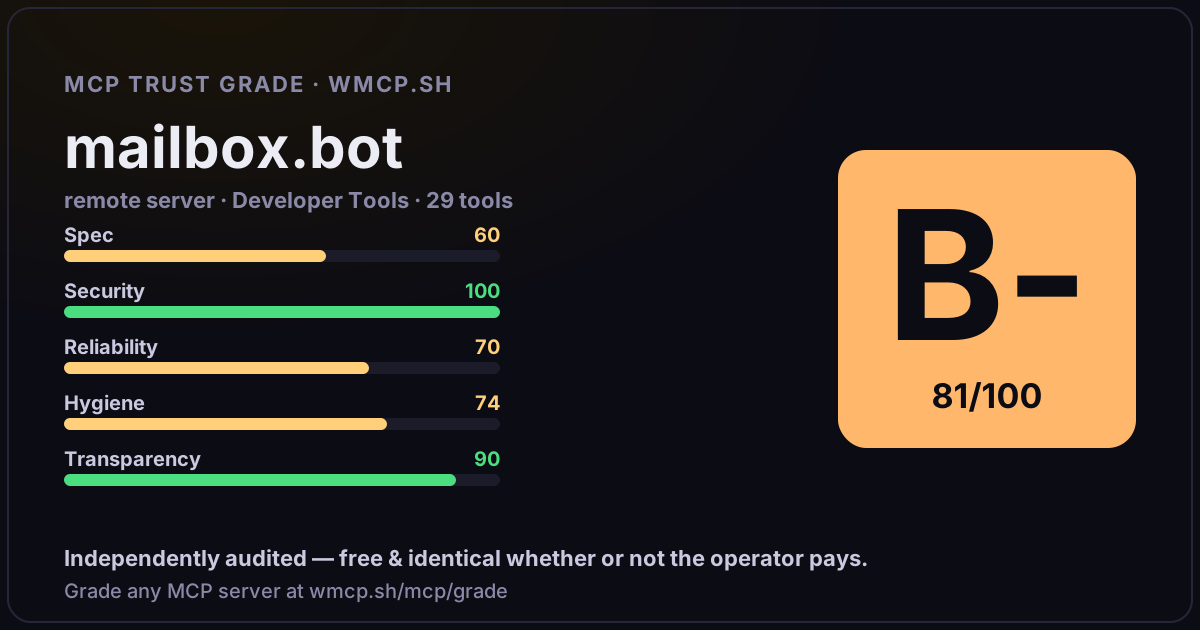
A 1200×630 card with the grade + audit — drop it in a post, Slack, or your repo.
Embed this grade
A live badge — it re-verifies itself and shows current stability. Static scorecards can't. Paste it in your README or site to show users you're independently audited.

[](https://wmcp.sh/mcp/grade/mailbox.bot)
<a href="https://wmcp.sh/mcp/grade/mailbox.bot"><img src="https://wmcp.sh/mcp/grade/mailbox.bot/badge.svg" alt="MCP Trust Grade B- · wmcp.sh"></a>
Agents: check this before connecting
Add the wmcp.sh trust oracle as an MCP server and call grade_mcp_server / check_mcp_drift in your agent's pre-connection gate:
https://wmcp.sh/mcp/trust
readOnly vs observed behavior) layer on via the wmcp.sh proxy.