api.trillboards.com
What it offers — 74 tools · Developer Tools
register_partnerRegister a new partner organization with Trillboards. WHEN TO USE: - First-time setup for a new partner integration - Creating a new partner account t
get_partner_infoGet information about the authenticated partner account. WHEN TO USE: - Checking current partner status and stats - Verifying API key is working - Get
register_deviceRegister or update a device in the partner's network. WHEN TO USE: - Adding a new screen/kiosk/vending machine to the network - Updating device locati
list_devicesList all devices registered to the partner account. WHEN TO USE: - Getting an overview of all connected devices - Finding devices by status (online/of
get_deviceGet detailed information about a specific device. WHEN TO USE: - Checking status of a single device - Getting device configuration details - Debugging
delete_deviceSoft-delete a device from the partner account. WHEN TO USE: - Removing a device that's been decommissioned - Cleaning up test devices - Removing a dev
get_device_adsGet current ads scheduled for a device (for testing). WHEN TO USE: - Testing device ad delivery - Debugging which ads are being shown - Verifying ad t
record_impressionRecord a single ad impression from a device. WHEN TO USE: - Reporting that an ad was displayed on a device - Recording impression with detailed metada
batch_impressionsRecord multiple impressions in a single request (up to 100). WHEN TO USE: - Bulk reporting impressions from offline period - Efficient batch processin
device_heartbeatSend a heartbeat signal from a device to report its status. WHEN TO USE: - Regular device health monitoring (every 30-60 seconds) - Reporting current
get_analyticsGet analytics data for the partner account. WHEN TO USE: - Viewing overall performance metrics - Analyzing device performance - Generating reports on
create_webhookCreate a new webhook subscription for real-time events. WHEN TO USE: - Setting up real-time notifications for device events - Integrating with externa
list_webhooksList all webhook subscriptions for the partner account. WHEN TO USE: - Viewing all configured webhooks - Auditing webhook subscriptions - Finding a we
update_webhookUpdate an existing webhook subscription. WHEN TO USE: - Changing the webhook endpoint URL - Adding or removing subscribed events - Enabling or disabli
delete_webhookDelete a webhook subscription. WHEN TO USE: - Removing a webhook that's no longer needed - Cleaning up old integrations - Removing test webhooks RETUR
test_webhookSend a test event to a webhook endpoint. WHEN TO USE: - Verifying webhook endpoint is working - Testing integration during development - Debugging web
get_webhook_deliveriesGet delivery history for a webhook. WHEN TO USE: - Debugging failed webhook deliveries - Auditing webhook activity - Checking delivery success rates R
discover_inventoryDiscover available DOOH screens in the Trillboards network. WHEN TO USE: - Finding screens by venue type (retail, transit, office, etc.) - Finding scr
+56 more tools
- ✓ initialize → protocolVersion 2025-06-18
- ✓ initialize HTTP 200
- ✓ unknown method → -32601
- ✓ tools/list → 74 tools
- ✓ every tool has name + inputSchema
- 74 tools scanned
- no injection markup
- no secret-path refs
- single-probe latency 2933ms (PRELIMINARY — continuous uptime/p95 from proxy telemetry lands in v2)
- 89% of tools have typed inputSchema
- 0/74 declare outputSchema
- 4 destructive-by-name tools lack safety annotations
- HTTPS ✓
- advertises protocol 2025-06-18
Observed behavior
No proxied traffic observed for this host yet. Connect it at /connect and its grade gains a measured Reliability score + per-tool behavioral evidence — the half a static scan can't produce.
Findings
We re-grade api.trillboards.com on a schedule and alert your Slack/webhook the moment its tools change or its grade drops — rug-pull insurance for the connection.
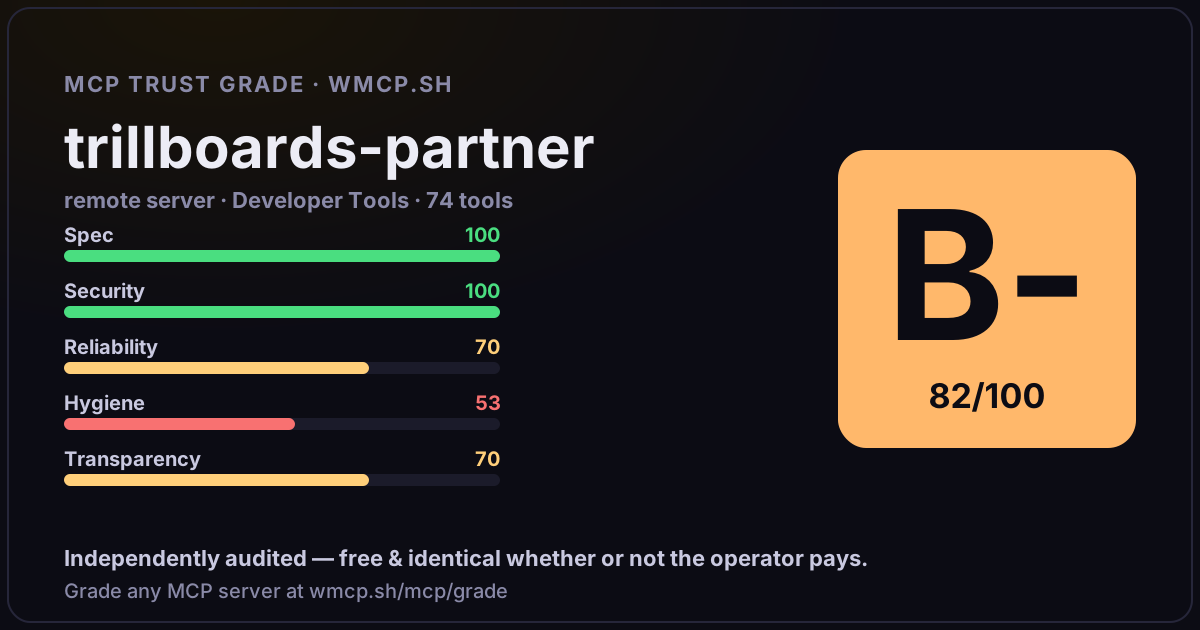
Share this report card
A 1200×630 card with the grade + audit — drop it in a post, Slack, or your repo.
Embed this grade
A live badge — it re-verifies itself and shows current stability. Static scorecards can't. Paste it in your README or site to show users you're independently audited.

[](https://wmcp.sh/mcp/grade/api.trillboards.com)
<a href="https://wmcp.sh/mcp/grade/api.trillboards.com"><img src="https://wmcp.sh/mcp/grade/api.trillboards.com/badge.svg" alt="MCP Trust Grade B- · wmcp.sh"></a>
Agents: check this before connecting
Add the wmcp.sh trust oracle as an MCP server and call grade_mcp_server / check_mcp_drift in your agent's pre-connection gate:
https://wmcp.sh/mcp/trust
readOnly vs observed behavior) layer on via the wmcp.sh proxy.