api.dotnova.io
What it offers — 62 tools · Developer Tools
accept_org_inviteAccept a pending organization invite by organization name.
add_task_dependencyAdd a dependency between tasks. Use this to express that a task is blocked by another task (must complete first) or relates to it. This prevents conte
add_team_memberAdd a member to a team. Find the team by name or ID, and the user by name or email.
assign_taskAssign a user to a task by name or email. The user is added to the task's assignees and linked in the knowledge graph.
create_positionCreate a new job position/title in your organization (admin only).
create_projectCreate a new project in your organization. You will be added as the project owner.
create_sprintCreate a new sprint for a project. Automatically migrates non-completed tasks (todo/in_progress) from the previous sprint. On first use, creates Sprin
create_taskCreate a new task in a project. Tasks track work items and can be assigned to team members and linked to sessions.
create_teamCreate a new team in your organization. You will be added as team lead.
delete_documentDelete a document from the knowledge base. This permanently removes the document.
delete_positionDelete a position permanently (admin only). Find by title or ID.
delete_projectDelete a project permanently (admin only). Find by name or ID.
delete_taskDelete a task permanently. The task and all its assignee links are removed.
delete_teamDelete a team permanently (admin only). Find by name or ID.
delete_userDelete (soft-delete) a user from your organization (admin/owner only).
end_sessionEnd a work session. This triggers context block generation — your activities are summarized and stored in the knowledge graph for future reference.
find_documentsSearch documents in the organization's knowledge base. Filter by category, tags, project, or free-text query. Returns document metadata — use get_docu
get_contextGet intelligent context from the knowledge graph. Pass a query describing what you need — the system will automatically route to the right data source
+44 more tools
- ✓ initialize → protocolVersion 2025-06-18
- ✓ initialize HTTP 200
- ✓ unknown method → -32601
- ✓ tools/list → 62 tools
- ✓ every tool has name + inputSchema
- 62 tools scanned
- no injection markup
- no secret-path refs
- single-probe latency 948ms (PRELIMINARY — continuous uptime/p95 from proxy telemetry lands in v2)
- 89% of tools have typed inputSchema
- 0/62 declare outputSchema
- 15 destructive-by-name tools lack safety annotations
- HTTPS ✓
- advertises protocol 2025-06-18
Observed behavior
No proxied traffic observed for this host yet. Connect it at /connect and its grade gains a measured Reliability score + per-tool behavioral evidence — the half a static scan can't produce.
Findings
We re-grade api.dotnova.io on a schedule and alert your Slack/webhook the moment its tools change or its grade drops — rug-pull insurance for the connection.
Share this report card
A 1200×630 card with the grade + audit — drop it in a post, Slack, or your repo.
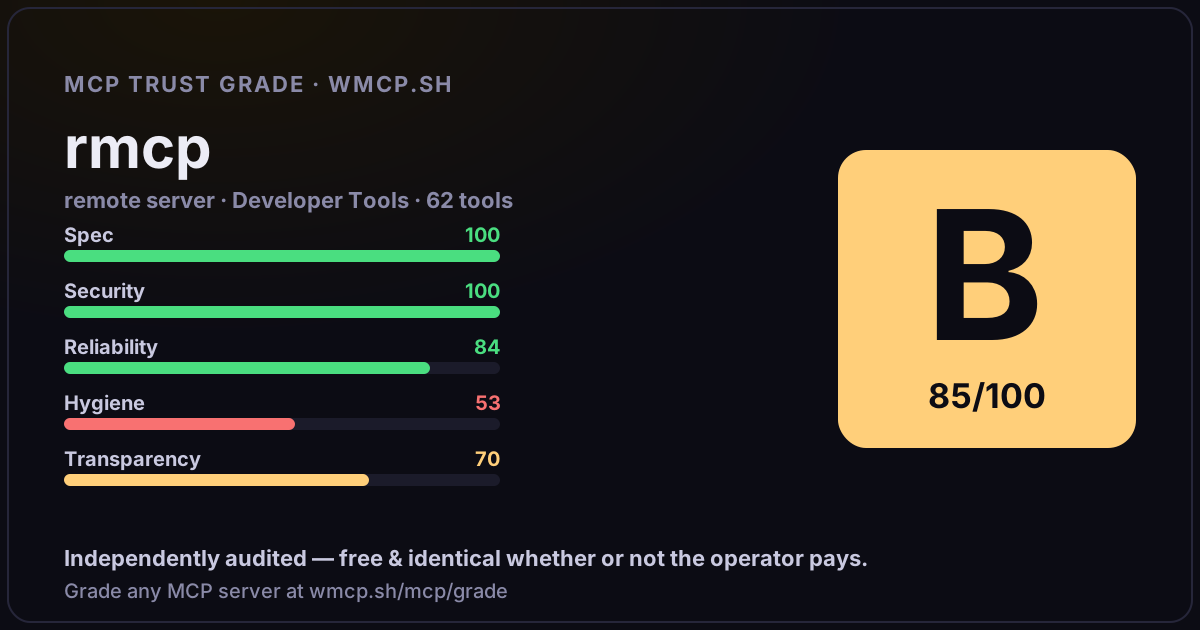
Embed this grade
A live badge — it re-verifies itself and shows current stability. Static scorecards can't. Paste it in your README or site to show users you're independently audited.
[](https://wmcp.sh/mcp/grade/api.dotnova.io)
<a href="https://wmcp.sh/mcp/grade/api.dotnova.io"><img src="https://wmcp.sh/mcp/grade/api.dotnova.io/badge.svg" alt="MCP Trust Grade B · wmcp.sh"></a>
Agents: check this before connecting
Add the wmcp.sh trust oracle as an MCP server and call grade_mcp_server / check_mcp_drift in your agent's pre-connection gate:
https://wmcp.sh/mcp/trust
readOnly vs observed behavior) layer on via the wmcp.sh proxy.