api.ainote.dev
What it offers — 32 tools · Developer Tools
list_tasksList all tasks from AI Note with advanced filtering, date ranges, location search, and sorting
create_taskCreate a new task in AI Note. Supports full task creation with dates, times, location, notes, and notifications.
update_taskUpdate an existing task. All fields are optional except id.
delete_taskSoft-delete a task by ID. Destructive but reversible within 30 days (TaskCleanupJob purges trash daily at 2am KST). Returns 404 if the task does not e
list_categoriesList all task categories for the authenticated user. Returns id/name/color/icon/task_count tuples. Read-only — use create_task with category_id to ass
list_papersList notes/papers from AI Note. Supports keyword search across title and content, category filtering, pagination, and sorting. Returns id/title/conten
list_dev_docsList dev documents under the dev/ category hierarchy. Filter by subcategory (claude, cursor, windsurf, copilot, docs, etc.), search by title, or filte
get_dev_docGet a single dev document by title or id. Returns full content.
create_dev_docSave a document to AI Note cloud for multi-device sync and persistent storage. PRIMARY USE CASES: - Memory files: ~/.claude/projects/.../memory/MEMORY
update_dev_docUpdate an existing dev document. Supports replace (default), append, or prepend modes. Optionally update the local_path for sync.
pull_dev_docsRestore all synced files to this device. Fetches every dev doc that has a local_path set and writes the content to that path on disk. WHEN TO USE: - F
delete_dev_docSoft-delete a dev document by title or UUID. Reversible from trash. Pass `category` when multiple docs share the same title across subcategories (memo
list_dev_categoriesList all subcategories under dev/ (memory, claude, cursor, env, docs, mcp, custom...) with document counts. Use to discover which categories exist bef
signup_and_get_keyCreate a new AI Note account and get an MCP API key. No authentication required. Use this if you don't have an account yet.
login_and_get_keyLog in to an existing AI Note account and return an MCP API key. No prior authentication required. SIDE EFFECT: if the user has no MCP key yet, this c
get_setup_guideGet instructions for setting up AI Note MCP in Claude Desktop, Cursor, or other MCP clients. No authentication required.
vault_listList the authenticated user's GitHub-backed vaults. Each entry includes slug, github_repo_full_name, sync status, indexed file count, and is_primary f
vault_createCreate a new private vault as a GitHub repository under the user's account. Requires the user to have completed the GitHub App install flow first.
+14 more tools
- ✓ initialize → protocolVersion 2025-03-26
- ✓ initialize HTTP 200
- ✓ unknown method → -32601
- ✓ tools/list → 32 tools
- ✓ every tool has name + inputSchema
- 32 tools scanned
- no injection markup
- no secret-path refs
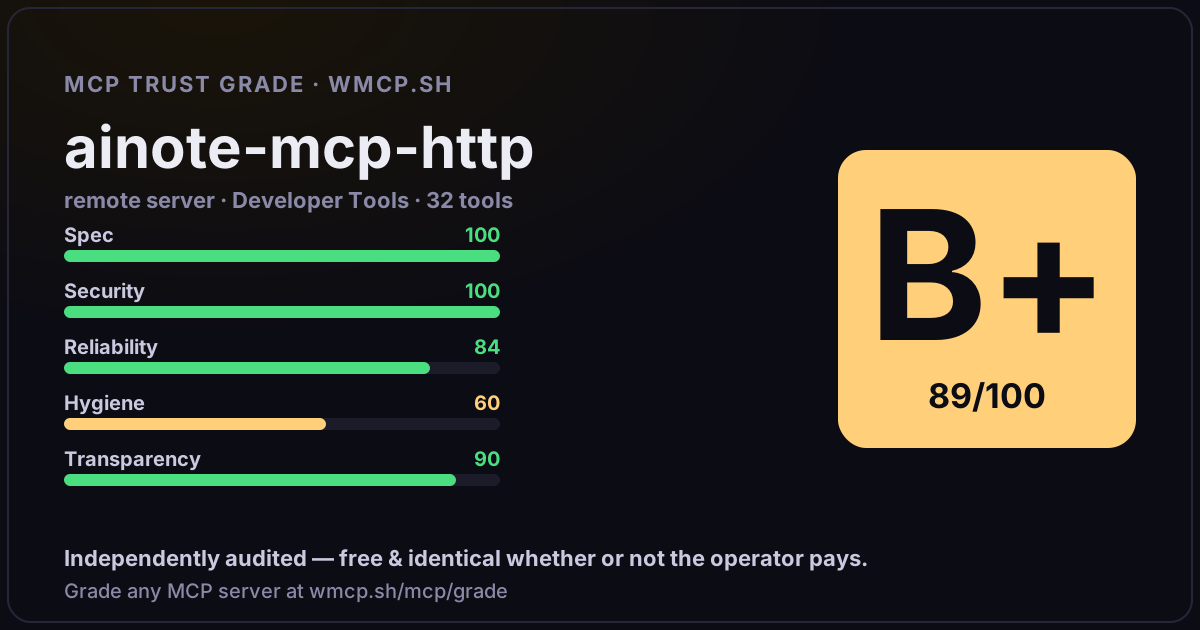
- single-probe latency 1455ms (PRELIMINARY — continuous uptime/p95 from proxy telemetry lands in v2)
- 84% of tools have typed inputSchema
- 0/32 declare outputSchema
- 2 destructive-by-name tools lack safety annotations
- HTTPS ✓
- RFC 9728 oauth-protected-resource metadata ✓
- advertises protocol 2025-03-26
Observed behavior
No proxied traffic observed for this host yet. Connect it at /connect and its grade gains a measured Reliability score + per-tool behavioral evidence — the half a static scan can't produce.
Findings
We re-grade api.ainote.dev on a schedule and alert your Slack/webhook the moment its tools change or its grade drops — rug-pull insurance for the connection.
Share this report card
A 1200×630 card with the grade + audit — drop it in a post, Slack, or your repo.
Embed this grade
A live badge — it re-verifies itself and shows current stability. Static scorecards can't. Paste it in your README or site to show users you're independently audited.
[](https://wmcp.sh/mcp/grade/api.ainote.dev)
<a href="https://wmcp.sh/mcp/grade/api.ainote.dev"><img src="https://wmcp.sh/mcp/grade/api.ainote.dev/badge.svg" alt="MCP Trust Grade B+ · wmcp.sh"></a>
Agents: check this before connecting
Add the wmcp.sh trust oracle as an MCP server and call grade_mcp_server / check_mcp_drift in your agent's pre-connection gate:
https://wmcp.sh/mcp/trust
readOnly vs observed behavior) layer on via the wmcp.sh proxy.